


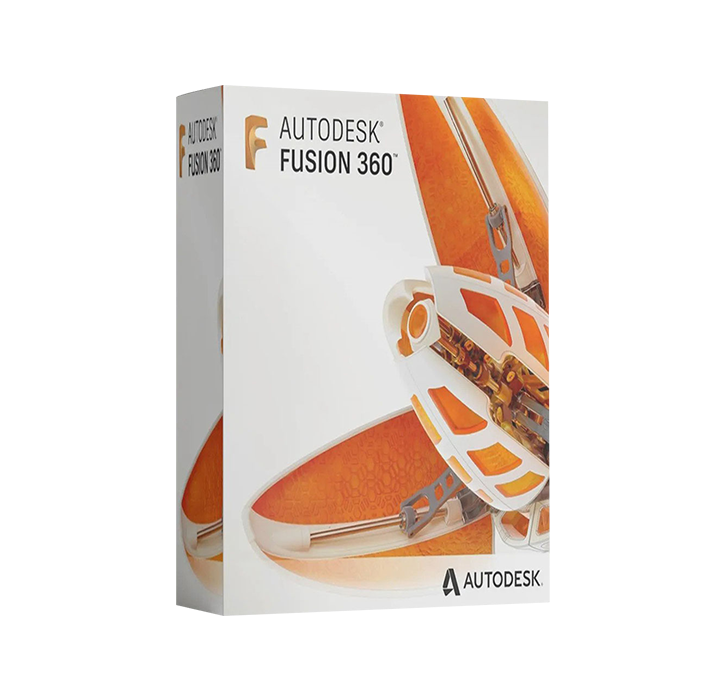
AUTODESK FUSION 360
Fusion 360: More than CAD, it’s the future of design and manufacturing it’s the first and only integrated cloud CAD, CAM, CAE, and PCB software platform of its kind
From £89.95


AUTODESK FUSION 360 LICENSE
Original and guaranteed by Nextdigitalkey.com
Fusion 360 is a cloud-based 3D modeling, CAD, CAM, CAE, and PCB software platform for professional product design and manufacturing.
-
Design and engineer products how you want to ensure aesthetics, form, fit, and function
-
Engineer, design, and create anything with comprehensive electronics and PCB design tools
- Save time and money and get quality parts out the door faster
Professionals who use Fusion 360
3D CAD/CAM for machinists:
Machine quality parts faster. Reduce cycle times to improve the bottom line.
Design systems for collaborators:
Smart tools let you connect extended teams in real-time.
3D modeling for mechanical engineers:
Process controls to design, simulate, and manufacture all in one program.
3D PCB design for electronics engineers:
Unify schematic, PCB, libraries, simulation, and mechanical design.
3D prototyping for industrial designers:
Speed up ideation and connect with engineering teams faster.
A modern 3D platform for educators:
Prep students for careers in design, engineering, and manufacturing.
License Complete with all Autodesk Fusion 360 functionalities.
NUMBER OF DEVICES: 1
OPERATING SYSTEM: WINDOWS / Mac Os
LICENSE DURATION: PERPETUAL (No expiry)
Be the first to review “AUTODESK FUSION 360”
For Windows
| System Requirements for Autodesk Fusion (Windows) | ||
|---|---|---|
| Minimum | Recommended | |
| Operating System | Windows 10, 22H2 (Build 19045 or newer) Microsoft Modern Lifecycle Policy Pre-release and Insider Windows builds are not eligible for product support. Note: The final version of Windows 10, 22H2, will reach end of support from Microsoft on October 14, 2025. | Windows 11, version 21H2 (Build 22000 or newer) Microsoft Modern Lifecycle Policy Pre-release and Insider builds are not supported. |
| CPU (Processor) | x86-64 processor 2 performance cores, 4 threads 3GHz+ turbo clock rate Example: Intel Core i3, AMD Ryzen 3, or similar 32-bit processors are not compatible with Fusion ARM64 devices can run Fusion on Windows 11 using XtaJIT64/Prism emulation. This functionality has not yet completed certification by Autodesk Fusion. | x86-64 processor 8+ performance cores, 16+ threads 3GHz+ base clock rate Example: Intel Core i7, AMD Ryzen 7, or similar |
| RAM (Memory) | 8GB | 32GB+ |
| GPU (Graphics) | 1GB Memory Dedicated/Integrated Graphics DirectX11 (Direct3D 10.1 or greater) Example: Intel UHD and Iris Pro, AMD Radeon RX Vega, Nvidia MX series Legacy graphics drivers are not supported. Driver updates must be supported by GPU manufacturer. | 8GB+ Memory Dedicated Graphics DirectX11 (Direct3D 10.1 or greater) For professional Fusion usage, Autodesk recommends Certified Graphics Hardware like AMD Radeon Pro WX, Intel Arc Pro, and Nvidia Quadro or similar. For hobbyist usage, consumer graphics similar to AMD Radeon RX 7000, Intel Arc A700, and Nvidia GeForce RTX 4000 series are generally compatible with Fusion, but have not been validated for use with the application card vendors nor Autodesk. |
| Display Resolution | 1366x768 @60hz (100% scale) Standard canvas graphics |
3480x2160 (4K) @60Hz (200% scale)
High resolution canvas graphics |
| Storage | 8.5GB for installation Hard Disk Drive | 15GB+ for installation and cached data Solid State Disk |
| Input Device | HID-compliant mouse or trackpad, optional Wacom tablet and 3Dconnexion SpaceMouse support | |
| Internet | 5 Mbps download; 1 Mbps upload See also: Ports and Domains required by Fusion | 25+ Mbps download; 5 Mbps upload See also: Ports and Domains required by Fusion |
| Dependencies | SSL 3.0, TLS 1.2+, .NET Framework 4.5 or newer required to submit crash reports | |
For Mac Os
| System Requirements for Autodesk Fusion (macOS) | ||
|---|---|---|
| Minimum | Recommended | |
| Operating System |
macOS 12 Monterey, until March 2025
Note: Fusion will not install or launch on unsupported legacy OS versions. Legacy Fusion client versions are not available for download. (Learn more)
|
macOS 13 Ventura
macOS 14 Sonoma
Note: Relief Pattern appearance on macOS 14 w/ Apple silicon
macOS 15 Sequoia certification estimated October 2024
|
| Processor/Chip | 1.4GHz dual-core Intel Core i5 processor or Apple silicon M1 chip | Apple silicon M1 Max chip or newer |
| RAM (Memory) | 4GB | 16GB+ |
| GPU (Graphics) | Intel HD Graphics 5000 or Apple M1 | Apple M1 Max chip or newer For professional usage, Autodesk recommends Certified Graphics Hardware |
| Display Resolution | 1366x768 @60hz Retina scaling disabled Standard canvas graphics | 3480x2160 (4K) @60Hz Retina scaling enabled High resolution canvas graphics |
| Storage | 8.5GB for installation Hard Disk Drive | 15GB+ for installation and cached data Solid State Disk |
| Input Device | HID-compliant mouse or trackpad, optional Wacom tablet and 3Dconnexion SpaceMouse support | |
| Internet | 5 Mbps download; 1 Mbps upload See also: Ports and Domains required by Fusion | 25+ Mbps download; 5 Mbps upload See also: Ports and Domains required by Fusion |
| Dependencies | SSL 3.0, TLS 1.2+, Rosetta 2 Note: While Autodesk Fusion itself is a native Apple silicon application, some specific commands are transitioning to ARM64 and will prompt for installation of Rosetta 2 as-needed. | |



Reviews
There are no reviews yet.